


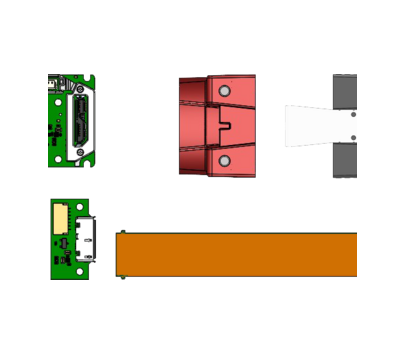
3D CAD files
(STEP) file downloads for Alvium
Here you can download STEP files for Alvium cameras.
About Alvium STEP files
This page provides STEP file components for the numerous Alvium hardware options.
Please read the Assembling Instructions document to learn:
- Which components you need to download.
- How to assemble your Alvium submodel from these STEP file components.
Downloading STEP files for standard Alvium cameras
- You need a 3D CAD viewer application to view and measure the STEP files. Download a STEP viewer free of charge: https://www.freecad.org.
- To assemble housed cameras from the STEP file components follow the Assembling Instructions document included in the link collection.
Alvium housings
// C-Mount and CS-Mount front housings with small filter window
These front housings are used for the following color and monochrome models (by sensor):
030 VSWIR (IMX991), 040 (IMX287), 050 (P480), 120 (AR0135), 130 VSWIR (IMX990), 131 (e2v EV76C560), 158 (IMX273), -192 (e2v EV76C570), 210 (AR0521), 240 (IMX392), 500 (AR0521), 501 NIR (AR0522)
// C-Mount and CS-Mount front housings with large filter window
These front housings are used for the following color and monochrome models (by sensor):
052 (IMX426), 203 (IMX422), 234 (IMX249), 235 (IMX174), 291 (IMX421), 319 (IMX265), 320 VSWIR (IMX993), 507 (IMX264), 508 (IMX250), 510 (IMX548), 511 (IMX547), 530 VSWIR (IMX992), 811 (IMX546), 812 UV (487), 895 (IMX267), 1236 (IMX304), 1240 (IMX226), 1242 (IMX545), 1620 (IMX542), 2040 (IMX541), 2050 (IMX183), 2460 (IMX540)
// S-Mount front housings without filter window
This front housing is used for all color and monochrome models.
Bare Board Cameras
// Standard Alvium CSI-2 bare board cameras
The following STEP file downloads apply to Alvium CSI-2 cameras, but also to assemble housed Alvium G1, G5, FP3, and GM2 cameras.
Note: The STEP file downloads for Alvium bare board cameras have been updated to the new hardware design according to the PCN Alvium CSI-2 + USB Mainboard Version Update. If you need STEP data for the previous hardware design, please contact our Technical Support team.
- 030 VSWIR (IMX991)
Alvium CSI2 Bare Board IMX990 991 VSWIR - 040 (IMX287)
Alvium CSI2 Bare Board IMX273 287 296 297 - 050 (P480)
Alvium CSI2 Bare Board P480 - 052 (IMX426)
Alvium CSI2 Bare Board IMX421 422 426 - 120 (AR0135)
Alvium CSI2 Bare Board AR0135CS - 130 VSWIR (IMX990)
Alvium CSI2 Bare Board IMX990 991 VSWIR - 131 (e2v EV76C560)
Alvium CSI2 Bare Board e2v EV76C560 - 158 (IMX273)
Alvium CSI2 Bare Board IMX273 287 296 297 - 192 (e2v EV76C570)
Alvium CSI2 Bare Board e2v EV76C570 - 203 (IMX422)
Alvium CSI2 Bare Board IMX421 422 426 - 210 (AR0521)
Alvium CSI2 Bare Board AR0521 0522 - 234 (IMX249)
Alvium CSI2 Bare Board IMX174 249 - 235 (IMX174)
Alvium CSI2 Bare Board IMX174 249 - 240 (IMX392)
Alvium CSI2 Bare Board IMX250 252 264 265 392 - 291 (IMX421)
Alvium CSI2 Bare Board IMX421 422 426 - 319 (IMX265)
Alvium CSI2 Bare Board IMX250 252 264 265 392 - 320 VSWIR (IMX993)
Alvium CSI2 Bare Board IMX992 993 VSWIR - 500 (AR0521)
Alvium CSI2 Bare Board AR0521 0522 - 500 (AR0522 NIR)
Alvium CSI2 Bare Board AR0521 0522 - 507 (IMX264)
Alvium CSI2 Bare Board IMX250 252 264 265 392 - 507 Pol (IMX264MYR / IMX264MZR)
Alvium CSI2 Bare Board IMX250 252 264 265 392 - 508 (IMX250)
Alvium CSI2 Bare Board IMX250 252 264 265 392 - 508 Pol (IMX250MYR / IMX250MZR)
Alvium CSI2 Bare Board IMX250 252 264 265 392 - 510 (IMX548)
Alvium CSI2 Bare Board IMX548 - 511 (IMX547)
Alvium CSI2 Bare Board IMX545 546 547 - 530 VSWIR (IMX992)
Alvium CSI2 Bare Board IMX992 993 VSWIR - 811 (IMX546)
Alvium CSI2 Bare Board IMX545 546 547 - 812 UV (487)
Alvium CSI2 Bare Board IMX487UV - 895 (IMX267)
Alvium CSI2 Bare Board IMX253 255 267 304 - 1236 (IMX304)
Alvium CSI2 Bare Board IMX253 255 267 304 - 1240 (IMX226)
Alvium CSI2 Bare Board IMX226 - 1242 (IMX545)
Alvium CSI2 Bare Board IMX545 546 547 - 1620 (IMX542)
Alvium CSI2 Bare Board IMX540 541 542 - 2040 (IMX541)
Alvium CSI2 Bare Board IMX540 541 542 - 2050 (IMX183)
Alvium CSI2 Bare Board IMX183 - 2460 (IMX540)
Alvium CSI2 Bare Board IMX540 541 542
// Standard Alvium USB 90° bare board cameras
The following STEP file downloads apply to Alvium USB cameras with a USB interface connector position of 90°: The connector is at the camera backside. In the naming for camera hardware options, this option is not mentioned.
Note: The STEP file downloads for Alvium bare board cameras have been updated to the new hardware design according to the PCN Alvium CSI-2 + USB Mainboard Version Update. If you need STEP data for the previous hardware design, please contact our Technical Support team.
- 030 VSWIR (IMX991)
Alvium USB 90° Bare Board IMX990 991 VSWIR - 040 (IMX287)
Alvium USB 90° Bare Board IMX273 287 296 297 - 050 (P480)
Alvium USB 90° Bare Board P480 - 052 (IMX426)
Alvium USB 90° Bare Board IMX421 422 426 - 120 (AR0135)
Alvium USB 90° Bare Board AR0135CS - 130 VSWIR (IMX990)
Alvium USB 90° Bare Board IMX990 991 VSWIR - 131 (e2v EV76C560)
Alvium USB 90° Bare Board e2v EV76C560 - 158 (IMX273)
Alvium USB 90° Bare Board IMX273 287 296 297 - 192 (e2v EV76C570)
Alvium USB 90° Bare Board e2v EV76C570 - 203 (IMX422)
Alvium USB 90° Bare Board IMX421 422 426 - 234 (IMX249)
Alvium USB 90° Bare Board IMX174 249 - 235 (IMX174)
Alvium USB 90° Bare Board IMX174 249 - 240 (IMX392)
Alvium USB 90° Bare Board IMX250 252 264 265 392 - 291 (IMX421)
Alvium USB 90° Bare Board IMX421 422 426 - 319 (IMX265)
Alvium USB 90° Bare Board IMX250 252 264 265 392 - 320 VSWIR (IMX993)
Alvium USB 90° Bare Board IMX992 993 VSWIR - 500 (AR0521)
Alvium USB 90° Bare Board AR0521 0522 - 501 NIR (AR0522)
Alvium USB 90° Bare Board AR0521 0522 - 507 (IMX264)
Alvium USB 90° Bare Board IMX250 252 264 265 392 - 507 Pol (IMX264MYR / IMX264MZR)
Alvium USB 90° Bare Board IMX250 252 264 265 392 - 508 (IMX250)
Alvium USB 90° Bare Board IMX250 252 264 265 392 - 508 Pol (IMX250MYR / IMX250MZR)
Alvium USB 90° Bare Board IMX250 252 264 265 392 - 510 (IMX548)
Alvium USB 90° Bare Board IMX548 - 511 (IMX547)
Alvium USB 90° Bare Board IMX545 546 547 - 530 VSWIR (IMX992)
Alvium USB 90° Bare Board IMX992 993 VSWIR - 811 (IMX546)
Alvium USB 90° Bare Board IMX545 546 547 - 812 UV (487)
Alvium USB 90° Bare Board IMX487UV - 895 (IMX267)
Alvium USB 90° Bare Board IMX253 255 267 304 - 1236 (IMX304)
Alvium USB 90° Bare Board IMX253 255 267 304 - 1240 (IMX226)
Alvium USB 90° Bare Board IMX226 - 1242 (IMX545)
Alvium USB 90° Bare Board IMX545 546 547 - 1620 (IMX542)
Alvium USB 90° Bare Board IMX540 541 542 - 2040 (IMX541)
Alvium USB 90° Bare Board IMX540 541 542 - 2050 (IMX183)
Alvium USB 90° Bare Board IMX183 - 2460 (IMX540)
Alvium USB 90° Bare Board IMX540 541 542
// Standard Alvium USB 180° bare board cameras
The following STEP file downloads apply to Alvium USB cameras with a USB interface connector position of 180°: The connector is at the camera backside. In the naming for camera hardware options, this option is not mentioned.
Note: The STEP file downloads for Alvium bare board cameras have been updated to the new hardware design according to the PCN Alvium CSI-2 + USB Mainboard Version Update. If you need STEP data for the previous hardware design, please contact our Technical Support team.
- 030 VSWIR (IMX991)
Alvium USB 180° Bare Board IMX990 991 VSWIR - 040 (IMX287)
Alvium USB 180° Bare Board IMX273 287 296 297 - 050 (P480)
Alvium USB 180° Bare Board P480 - 052 (IMX426)
Alvium USB 180° Bare Board IMX421 422 426 - 120 (AR0135)
Alvium USB 180° Bare Board AR0135CS - 130 VSWIR (IMX990)
Alvium USB 180° Bare Board IMX990 991 VSWIR - 131 (e2v EV76C560)
Alvium USB 180° Bare Board e2v EV76C560 - 158 (IMX273)
Alvium USB 180° Bare Board IMX273 287 296 297 - 192 (e2v EV76C570)
Alvium USB 180° Bare Board e2v EV76C570 - 203 (IMX422)
Alvium USB 180° Bare Board IMX421 422 426 - 234 (IMX249)
Alvium USB 180° Bare Board IMX174 249 - 235 (IMX174)
Alvium USB 180° Bare Board IMX174 249 - 240 (IMX392)
Alvium USB 180° Bare Board IMX250 252 264 265 392 - 291 (IMX421)
Alvium USB 180° Bare Board IMX421 422 426 - 319 (IMX265)
Alvium USB 180° Bare Board IMX250 252 264 265 392 - 320 VSWIR (IMX993)
Alvium USB 180° Bare Board IMX992 993 VSWIR - 500 (AR0521)
Alvium USB 180° Bare Board AR0521 0522 - 501 NIR (AR0522)
Alvium USB 180° Bare Board AR0521 0522 - 507 (IMX264)
Alvium USB 180° Bare Board IMX250 252 264 265 392 - 507 Pol (IMX264MYR / IMX264MZR)
Alvium USB 180° Bare Board IMX250 252 264 265 392 - 508 (IMX250)
Alvium USB 180° Bare Board IMX250 252 264 265 392 - 508 Pol (IMX250MYR / IMX250MZR)
Alvium USB 180° Bare Board IMX250 252 264 265 392 - 510 (IMX548)
Alvium USB 180° Bare Board IMX548 - 511 (IMX547)
Alvium USB 180° Bare Board IMX545 546 547 - 530 VSWIR (IMX992)
Alvium USB 180° Bare Board IMX992 993 VSWIR - 811 (IMX546)
Alvium USB 180° Bare Board IMX545 546 547 - 812 UV (487)
Alvium USB 180° Bare Board IMX487UV - 895 (IMX267)
Alvium USB 180° Bare Board IMX253 255 267 304 - 1236 (IMX304)
Alvium USB 180° Bare Board IMX253 255 267 304 - 1240 (IMX226)
Alvium USB 180° Bare Board IMX226 - 1242 (IMX545)
Alvium USB 180° Bare Board IMX545 546 547 - 1620 (IMX542)
Alvium USB 180° Bare Board IMX540 541 542 - 2040 (IMX541)
Alvium USB 180° Bare Board IMX540 541 542 - 2050 (IMX183)
Alvium USB 180° Bare Board IMX183 - 2460 (IMX540)
Alvium USB 180° Bare Board IMX540 541 542
// Alvium Flex bare board cameras
STEP files are common for CSI-2 and USB.
- 030 VSWIR (IMX991)
Alvium Flex Bare Board IMX990 991 VSWIR - 040 (IMX287)
Alvium Flex Bare Board IMX273 287 296 297 - 050 (P480)
Alvium Flex Bare Board P480 - 052 (IMX426)
Alvium Flex Bare Board IMX421 422 426 - 120 (AR0135)
Alvium Flex Bare Board AR0135CS - 130 VSWIR (IMX990)
Alvium Flex Bare Board IMX990 991 VSWIR - 131 (e2v EV76C560)
Alvium Flex Bare Board e2v EV76C560 - 158 (IMX273)
Alvium Flex Bare Board IMX273 287 296 297 - 192 (e2v EV76C570)
Alvium Flex Bare Board e2v EV76C570 - 203 (IMX422)
Alvium Flex Bare Board IMX421 422 426
- 210 (AR0521)
Alvium Flex Bare Board AR0521 0522 - 234 (IMX249)
Alvium Flex Bare Board IMX174 249 - 235 (IMX174)
Alvium Flex Bare Board IMX174 249 - 240 (IMX392)
Alvium Flex Bare Board IMX250 252 264 265 392 - 291 (IMX421)
Alvium Flex Bare Board IMX421 422 426 - 319 (IMX265)
Alvium Flex Bare Board IMX250 252 264 265 392 - 320 VSWIR (IMX993)
Alvium Flex Bare Board IMX992 993 VSWIR - 500 (AR0521)
Alvium Flex Bare Board AR0521 0522 - 501 NIR (AR0522)
Alvium Flex Bare Board AR0521 0522 - 507 (IMX264)
Alvium Flex Bare Board IMX250 252 264 265 392 - 507 Pol (IMX264MYR / IMX264MZR)
Alvium Flex Bare Board IMX250 252 264 265 392 - 508 (IMX250)
Alvium Flex Bare Board IMX250 252 264 265 392 - 508 Pol (IMX250MYR / IMX250MZR)
Alvium Flex Bare Board IMX250 252 264 265 392 - 510 (IMX548)
Alvium Flex Bare Board IMX548 - 511 (IMX547)
Alvium Flex Bare Board IMX545 546 547 487UV - 530 VSWIR (IMX992)
Alvium Flex Bare Board IMX992 993 VSWIR - 811 (IMX546)
Alvium Flex Bare Board IMX545 546 547 487UV - 812 UV (487)
Alvium Flex Bare Board IMX545 546 547 487UV - 895 (IMX267)
Alvium Flex Bare Board IMX253 IMX255 267 304 - 1236 (IMX304)
Alvium Flex Bare Board IMX253 IMX255 267 304 - 1240 (IMX226)
Alvium Flex Bare Board IMX226 - 1242 (IMX545)
Alvium Flex Bare Board IMX545 546 547 487UV - 1620 (IMX542)
Alvium Flex Bare Board IMX540 541 542 - 2040 (IMX541)
Alvium Flex Bare Board IMX540 541 542 - 2050 (IMX183)
Alvium Flex Bare Board IMX183 - 2460 (IMX540)
Alvium Flex Bare Board IMX540 541 542
More downloads
// Alvium Flex accessories
Downloads include the available components by interface.
// Alvium Frame
To be combined with the corresponding bare board camera.
// Alvium G1 BL (Board Level)
To be combined with the corresponding Alvium Flex bare board model (and front housing for G1 BL cameras with mount).